
Compare Suite starting version 5.0. supports keywords ignoring.
What is keywords ignoring
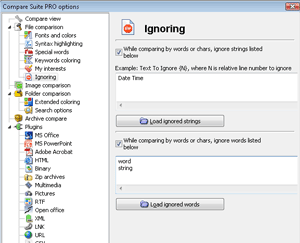 Sometime
documents might have some keywords that you would like to ignore. For
instance, it might be the line which contains "Date Time" keywords or
"Modified Date" keyword or "Checkout file ID". With Compare Suite user can
ignore certain line to make the process of comparison smoother.
Sometime
documents might have some keywords that you would like to ignore. For
instance, it might be the line which contains "Date Time" keywords or
"Modified Date" keyword or "Checkout file ID". With Compare Suite user can
ignore certain line to make the process of comparison smoother.
Two types of ignoring
There are two types of ignoring: keyword ignoring and line ignoring.
Keyword ignoring allows to ignore changes in certain words, for instance user can manage to ignore word "Tree", so if in changed file there will be "Trees" the Compare Suite will ignore this word. Once the word is ignored it is highlighted as ignored and not taken into account when generating comparison statistics.
Line ignoring allows to ignore line which contains a certain marker-keyword, for instance, the marker keyword might be "Date/time" and user can manage Compare Suite to ignore the line which contains this keyword or the line which is N-line after/before the line which contains this keyword.
How to access keywords ignoring
Use Tools > Options > Ignoring
Line Ignoring
The first text box is for Line Ignoring. Use the following syntax to ignore certain line:
Marker Keyword {N}. If the N=0 then Compare Suite will ignore line with "Marker Keyword", if N is 1 then Compare Suite will ignore the next line, if N=-1 the Compare Suite will ignore the previous line.
Keywords Ignoring
To use Keywords Ignoring just put the list of keywords to ignore into the second text box.